Architecture Diagrams - Some Thoughts
[A]in’t no engineer got time for [manually-updating and -tracking architecture diagrams]; that’s a moving target and a fool’s errand to keep updated!
Architecture Diagrams - Some Thoughts
The Problem
Let’s again say you have a site, say, One Cup Coding.
This site is fairly simple right now, but it would be nice to draw up an architecture diagram so that I know what I’ve built.
There are several ways to accomplish this goal, but the typical Fortune 50 approach is, “throw a team of people responsible for only this at that problem!”
That’s silly for quite a few reasons, but let’s address the issue we will also face as individuals: ain’t no engineer got time for that; that’s a moving target and a fool’s errand to keep updated!
There’s got to be a way to take my IaC code and make that generate a diagram, right?
One Solution - TF –> CFT –> AWS Console –> CloudFormation Designer view
This was the first approach I took, and it worked moderately well and could integrate with my SAM templates I had built.
- Convert Terraform configuration files to a CloudFormation Template (CFT) file.
- Upload the CFT file to S3.
- View using AWS Console –> CloudFormation –> Import from S3 –> View in Designer
This … worked, but it locked me into the Designer and didn’t really inter-operate with other tools in my tool-chain. Every time I wanted to make an update, I’d have to go through this process, move a couple boxes around, and export the diagram. The raw diagram, of course, was not available on my local machine for manipulation.
A Better-Seeming Solution
I came across CDK for Terraform as well as a Python plugin diagrams for parsing through Python-based CDK and generating a diagram.
That looked really promising, but I didn’t feel like getting my Terraform configuration files into Python, or otherwise trying to run CDK for Terraform in reverse to get back to CDK code from Terraform configuration files.
I had read quite some time ago about a standalone tool from AWS called CloudFormer, but that tool is long-gone. It has since been replaced by a tool which you can run–even locally!–to effectively do an everything-to-everything generation.
I’m now using this tool to scan my AWS configuration, then select the resources I want to include, then generate a diagram (embedded Draw.io) as mutable output. It’s a pretty decent setup.
Some caveats, as I’ve not been able to conduct a full security audit on the tool:
- Before handing my credentials to the tool–use your IaC credentials for scoping–I assigned the AWS-managed
ReadOnlypolicy to the account. - I ran the tool.
- I then created new credentials and invalidated the old ones for that account.
Use and Output
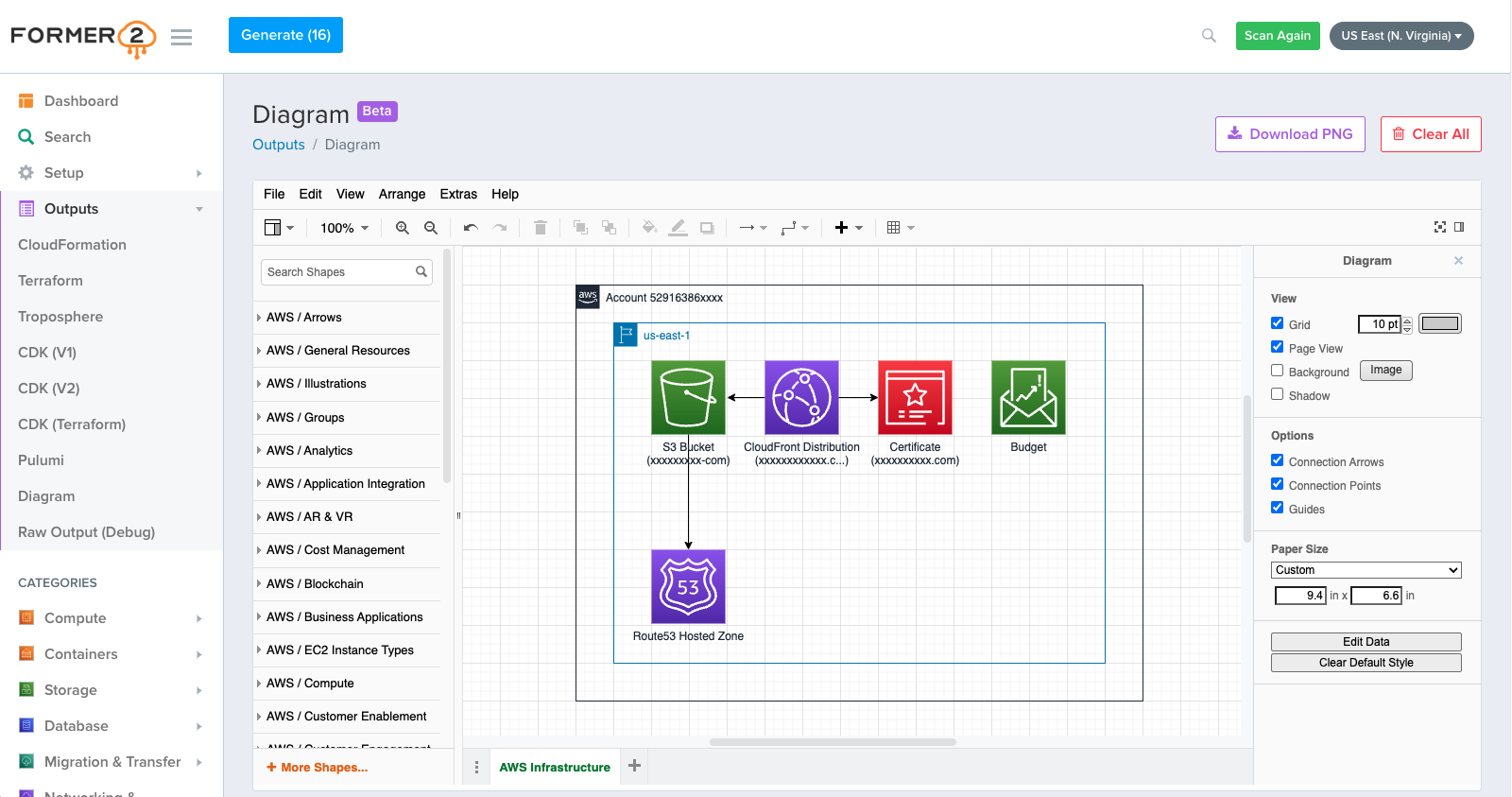

Summary
- Head to the GitHub repo for Former2
- git clone into a working directory
- Follow the instructions to build and run the Docker image locally
- Apply
ReadOnlypermissions to your IaC account, note itsaws_access_key_idandaws_secret_access_key - Feed these to the
Former2instance running on your local machine - Scan all, then select which resources to include in the output from the left-hand-navigation
- See/tweak output as-desired
- Rotate credentials for your IaC user account
- Invalidate the previous credentials for your IaC user account